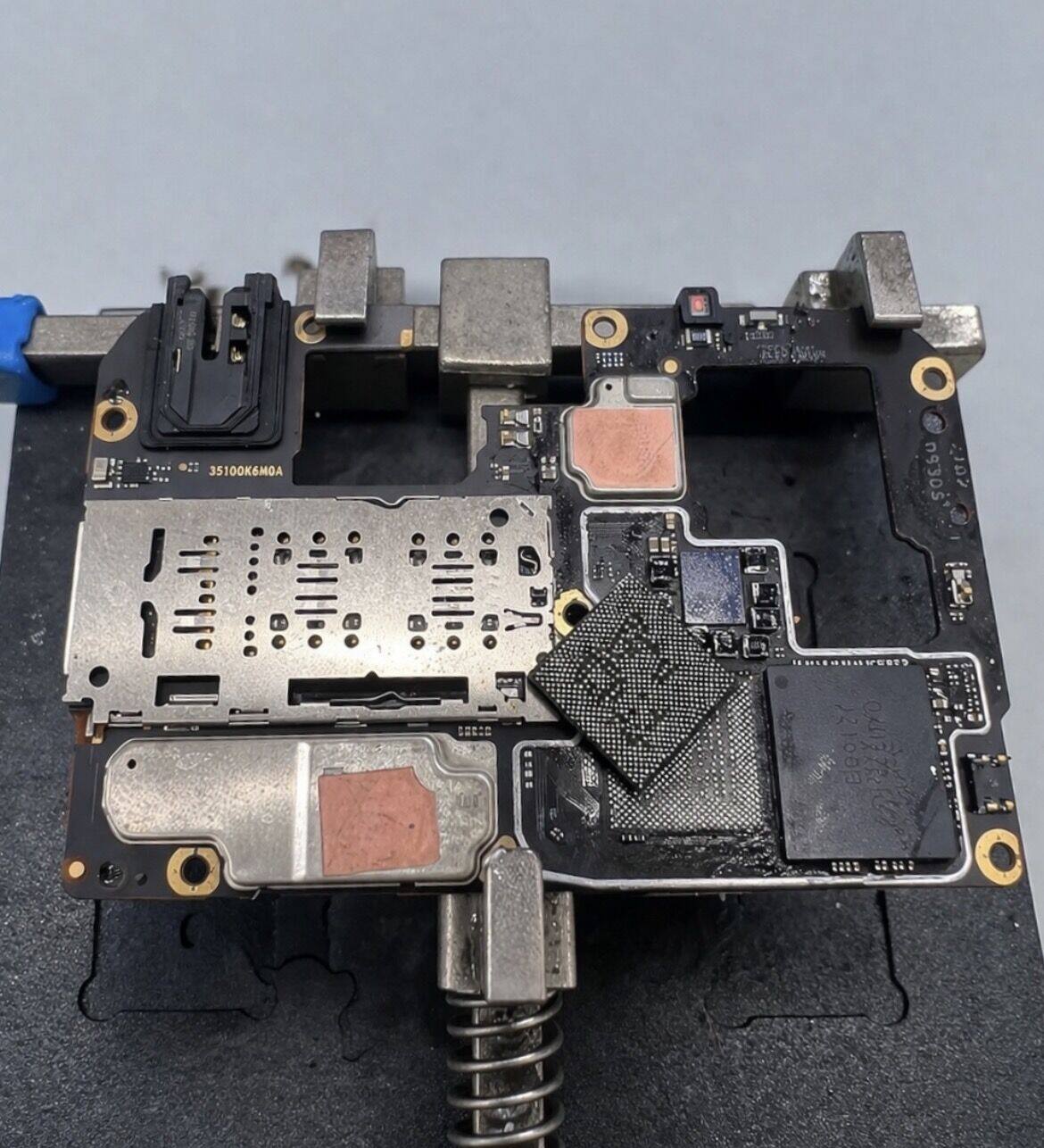
Data recovery for Android

We recover photos, videos and data from damaged Android phones with logic-board failure or that won't power on. Direct intervention on internal memory in complex cases.

Request diagnostic →

Every Android is different. Access isn't standard.

Unlike other devices, Android comes in many architectures: different makers, memory chips (eMMC / UFS) and encryption schemes.

Data recovery requires adapting the technique to each model, combining electronic repair and low-level memory access.

Memory types

  • • eMMC (older models)
  • • UFS (modern models)
  • • Hardware-encrypted systems
  • • CPU dependency in many cases

Common cases

01
Phone won't turn on
02
Cracked screen, no data access
03
Water damage
04
System lockout
05
Constant reboot
06
Damaged logic board

Recovery process

01

Device diagnostic

02

Logic-board analysis

03

Repair or bypass

04

Memory access

05

Data extraction

When you need a lab

Symptoms no software can solve

When an Android phone won't power on, has suffered physical damage or enters a boot loop, recovery apps stop being relevant: they require USB debugging enabled and the device booting. These are the symptoms that go straight to the lab.

01

Won't power on or vibrate

PMIC, charge management or CPU failure. Data intact on NAND. Electronic repair to regain system access.

02

Water damage or fall

Liquid between components, trace corrosion or a hit that has dislodged a chip. Don't power on — every boot worsens damage.

03

Bootloop or Android remnants

Eternal logo, broken recovery, or corrupt /data partition. The phone boots but doesn't mount the encrypted filesystem.

04

Black screen with vibration

The system boots but the LCD/OLED has died. Access via OTG or temporary screen replacement to extract the data.

Anatomy of the failure

eMMC, UFS, FBE and SoC dependency

Up to around 2017, Android phones used eMMC memory: a 153 or 169-ball BGA package with parallel interface and simple firmware. It was standard enough that you could desolder it, hook it to a programmer and read the full NAND outside the phone. If encryption wasn't active (common on mid-range of that era), data appeared directly readable on the ext4 filesystem. That window closed: from Android 6 onwards FDE encryption was on by default, and from Android 10 the whole ecosystem migrated to file-based encryption (FBE) anchored to hardware.

Modern memory is UFS 2.1, 3.1 or 4.0: ultra-fast serial interface, more complex package and, most importantly for recovery, keys derived in the SoC's TEE (Trusted Execution Environment). This means even if you desolder the chip and read every bit, what you get is encrypted noise: the keys needed to decrypt live in the original application chip. That's why on modern flagships the only path is to repair the board until you achieve a controlled boot.

Each manufacturer adds its own layer too. Samsung has Knox, which invalidates the TEE on detected tampering. Huawei from Mate 30 onwards locks the bootloader with device-unique signatures. Xiaomi requires linked Mi account for USB authorisation. Google Pixel features Titan M2, a dedicated security coprocessor. Knowing these per-model quirks separates a successful intervention from a definitive brick. We keep updated internal documentation and donor-board stock for the most common models in the Spanish market.

Before sending it

Mistakes that reduce recovery probability

Almost every Android arriving at the lab in critical state has had a previous attempt behind it. These are the most expensive — and the ones we see most often on the bench.

!

Powering on a wet phone

Water short-circuit between live traces turns recoverable corrosion into a burned board. Rule: power off and send.

!

Putting it in rice

Marketing-inherited myth. Rice absorbs very little and leaves starch particles in the connectors. If the water is already inside, you need to open and clean professionally.

!

Hard reset from recovery

Wiping /data on a system with FBE active erases the user's encryption keys. The data is still on NAND but irrecoverable — not even with chip-off.

!

Flashing ROM or firmware

Any flashing rewrites critical partitions (boot, system, vendor). If your failure wasn't software, you've just added a new one on top of the original.

!

Forcing bootloader unlock

Unlocking the bootloader triggers a full data wipe as anti-theft measure. If you want to recover photos, never unlock the bootloader before extracting them.

!

Charging with a generic charger after water

An unstable-voltage charger on a damaged PMIC can finish off the power rail. If in doubt, don't plug it in.

Full coverage

Android brands and models we recover

We work with every common manufacturer in the Spanish market. If your brand or model isn't listed, write to us: actual coverage is much wider than this representative list.

01

Samsung Galaxy

S series (S8 to S25), Note (8 to 20 Ultra), A (A52, A54, A55), Z Fold/Flip foldables. Knox subsystem handling and KeyMaster-encrypted partitions.

02

Xiaomi / Redmi / Poco

Mi 11/12/13/14, Redmi Note 10-13, Poco F/X. Donor-board stock for the best-selling models in Spain and Mi account bypass when applicable.

03

OPPO, Realme, OnePlus

Find X, Reno, Realme GT/Pro, OnePlus 9-12. BBK family with Snapdragon and MediaTek Dimensity SoCs. Chip-off support on pre-2019 eMMC.

04

Google Pixel

Pixel 4 to Pixel 9, including Pixel a-series. Full support for the Titan M/M2 coprocessor and hardware-encrypted partitions.

05

Huawei / Honor

P30 to P60, Mate 30 to 60, Honor Magic. We handle Kirin without Google services and factory-locked bootloaders since 2019.

06

Motorola and others

Moto G, Moto Edge, Edge 40/50, Razr foldables. Also Sony Xperia, Asus ROG Phone, Nothing Phone, Realme/Vivo and legacy eMMC models.

Compatible SoCs: Snapdragon · MediaTek Dimensity · Exynos · Tensor · Kirin · Unisoc
Frequently asked questions

What we get asked the most about Android

Can photos be recovered from an Android that won't turn on?

+
In most cases, yes. When the phone doesn't turn on due to board failure (PMIC, charge management, CPU) the data remains intact in internal memory. We repair the component blocking boot to access the system, or, in extreme cases, desolder the memory chip (eMMC) and read its content on a bench programmer. On modern UFS models with hardware encryption, the only path is repairing the board because memory without the original CPU is inaccessible.

Do you recover data if the screen is broken?

+
Yes, and it's usually one of the simplest cases. If the phone boots and vibrates on press but shows no image, we connect a compatible service screen or use OTG with keyboard and mouse to authorise USB access. On models without OTG or with touch-only unlock, we temporarily replace the screen to extract the data before returning the phone.

How much does Android data recovery cost?

+
Depends on the failure. A logical recovery with a working phone starts at €200. Electronic board repair to extract data usually runs €350–600. eMMC chip-off with programmer read can be €400–800. UFS cases with hardware encryption are the most complex and are quoted after diagnostic.

My phone got water damage. Is it recoverable?

+
Liquid damage is one of the most urgent cases. Absolute rule: do not power the phone on under any circumstances. Each boot accelerates corrosion of traces and vias. In the lab the device is disassembled, the board is ultrasonically cleaned in a specific liquid, corroded components are identified and repaired, and a controlled boot is attempted to extract the data.

What's the difference between eMMC and UFS for recovery?

+
eMMC is the memory of older Android phones (up to roughly 2017-2018, mid-range up to 2020): a 153 or 169-ball BGA chip that can be desoldered and read in a standalone programmer. UFS is modern memory (most mid-to-high range and all flagships), a more complex package with high-speed serial interface and, almost always, encryption anchored to SoC hardware. The latter prevents reading the NAND outside the phone: recovery means repairing the board.

What is FBE encryption and why does it matter?

+
FBE (File-Based Encryption) is the per-file encryption Android uses by default since version 10. Keys are derived from the user's PIN/pattern and stored in the SoC's TEE (Trusted Execution Environment). If the board dies or the user forgets their PIN, the data physically remains in memory but is unreadable without TEE keys. This makes many chip-offs on modern Android unviable.

Do you recover Samsung, Xiaomi, OPPO, Huawei, Pixel, Realme...?

+
Yes. We work with every major brand in the Spanish market. Samsung Galaxy S/A/Note, Xiaomi Mi/Redmi/Poco, OPPO Find/Reno, Realme GT/Pro, Huawei P/Mate (including Kirin without Google services), Google Pixel, OnePlus, Honor, Motorola Edge/Moto G. Each brand has its own board and bootloader quirks, but the general flow is the same.

How long does recovery take?

+
Initial diagnostic within 24 hours of receipt. Logical recovery is usually delivered in 48-72 hours. Electronic repair with data extraction takes 5-10 days depending on the component. eMMC chip-off completes in 7-15 days. In any case, we tell you the exact timeframe when confirming the diagnostic — before you accept the quote.

Recover your data from a damaged Android phone

Free evaluation. You only pay if we recover the information.

Request diagnostic

Privacy

Cookies

We use technical cookies to keep your Pro session working and, optionally, analytics cookies to understand how the site is used. You decide. More details in our cookie policy.